
Download Talking Timer – Customizable TTS Countdown for Creative Work
Overview
The Talking Timer is a lightweight desktop application designed to assist users in managing time during focused creative tasks. Born from the need for a simple yet effective countdown tool, it was initially developed to support participation in the Daily Spitpaint challenge—a 30-minute time-limited digital painting session. The software offers a streamlined interface with customizable timer durations and audio alerts, making it suitable for users who require structured time intervals for productivity, creative workflows, or task-based scheduling.
Target users include digital artists, content creators, students, and professionals engaged in time-sensitive projects. The app supports a variety of use cases beyond digital painting, such as Pomodoro-style work sessions, meditation, cooking, or study breaks. Its core purpose is to provide timely, non-intrusive notifications through text-to-speech (TTS) alerts, helping users maintain focus and workflow continuity without constant manual monitoring.
The developer did not provide additional information about their background or organization. The software was built as a Chrome App, allowing for easy integration with Windows, Mac, and Chrome OS platforms. This design choice enables quick access via the Taskbar or Dock, enhancing usability for users who prefer minimal setup and instant launch capabilities.
Key Features & Capabilities
- Customizable Timer Duration: Users can set the countdown to any desired length, enabling flexibility for various time-based activities such as timed drawing sessions, study intervals, or cooking prep.
- Text-to-Speech (TTS) Alerts: The app delivers spoken notifications at user-defined intervals, helping users stay aware of time progression without needing to glance at the screen.
- Taskbar/Dock Pinning: Designed as a Chrome App, it can be pinned to the Taskbar (Windows) or Dock (Mac), allowing instant access without launching the Chrome browser.
- Always-On-Top Mode: The timer window can be kept above other applications, ensuring visibility during full-screen work, such as digital art creation or video editing.
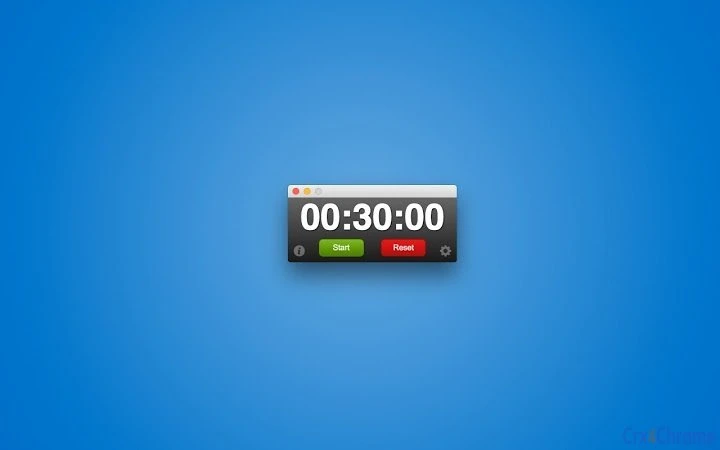
- Minimalist Interface: The clean, uncluttered design reduces visual distractions, supporting deep focus and seamless integration into creative or productivity workflows.
For example, a digital artist might set a 30-minute timer with TTS alerts at 10-minute intervals to stay on track during a Spitpaint session. A student could use it to manage 25-minute study blocks with voice reminders to take breaks. The app’s simplicity and adaptability make it ideal for users seeking a no-frills, reliable timer with audio feedback.
User Interface, Workflow & Performance
The user interface of Talking Timer is intentionally minimal, featuring a central countdown display with clear visual indicators and straightforward controls. Navigation is direct—users input the desired time and activate the timer with a single click. The interface remains consistent across supported platforms, ensuring a familiar experience for Windows, Mac, and Chrome OS users.
Workflow efficiency is enhanced by the app’s ability to be pinned to the Taskbar or Dock, allowing immediate access without launching Chrome. This reduces friction and supports a continuous workflow, especially during creative sessions where minimizing interruptions is essential. The app operates with low visual and system impact, though exact performance details were not specified.
Stability is expected to be consistent with standard Chrome Apps, given the platform’s sandboxed environment. However, the developer did not provide information on CPU or RAM usage. General software behavior suggests efficient resource handling, but users should monitor performance during extended use, particularly on older or low-spec systems. The app does not appear to require background processes beyond the timer and TTS engine.
Compatibility & System Requirements
Talking Timer is compatible with Windows, Mac, and Chrome OS, making it accessible across multiple desktop environments. The application was developed as a Chrome App, which allows it to run within the Chrome browser ecosystem but can be launched independently after being pinned to the Taskbar or Dock.
The installation size is 1.2 MB, indicating a lightweight footprint suitable for systems with limited storage. The software version is 1.0, suggesting a stable initial release with core functionality in place. The developer did not specify exact system requirements, such as minimum RAM, processor speed, or supported Chrome versions.
Compatibility information was partially provided. Users are advised to ensure their system has a recent version of Chrome installed to run the app properly. For optimal performance, a stable internet connection may be required for TTS functionality, though offline operation is possible depending on the system’s TTS engine.
Pros and Cons
Pros
- Lightweight at just 1.2 MB
- Easy to pin to Taskbar/Dock for instant access
- Customizable timer duration and TTS alerts
- Always-on-top option for uninterrupted visibility
- Free to download and use
- Designed for creative and productivity workflows
Cons
- Requires Chrome browser to run initially
- Exact system requirements were not listed
- Dependent on system TTS engine for audio output
- Version 1.0 suggests limited feature expansion in early release
- Platform-specific behavior may vary across Windows, Mac, and Chrome OS
FAQ Section
Is Talking Timer available for Windows, Mac, and Chrome OS?
Yes, the app is compatible with Windows, Mac, and Chrome OS, as it was developed as a Chrome App for cross-platform accessibility.
How do I pin Talking Timer to my Taskbar or Dock?
Open the app from Chrome, then right-click its icon in the Taskbar (Windows) or Dock (Mac) and select “Pin to Taskbar” or “Keep in Dock” for quick access.
Is the software free to use?
Yes, Talking Timer is available at no cost. There are no subscription fees or in-app purchases.
Does the app require an internet connection?
The app itself does not require a constant internet connection, but TTS functionality may depend on the system’s built-in text-to-speech engine or online services, depending on the platform.
Can I use Talking Timer offline?
Yes, the timer can function without an internet connection. However, audio alerts may rely on the local TTS engine, which may not be available on all systems.
Final Thoughts + CTA
Talking Timer delivers a focused, no-nonsense solution for users who need reliable time management during creative or task-based work. Its minimalist design, customizable alerts, and seamless integration with the Taskbar and Dock make it a practical tool for digital artists, students, and professionals alike. While it operates within the constraints of the Chrome App ecosystem, its lightweight nature and free availability enhance its appeal.
For those seeking a simple, customizable countdown tool with audio feedback, Talking Timer offers a solid starting point. The app’s alignment with real-world use cases like the Daily Spitpaint challenge demonstrates its practical value. With room for future enhancements, it stands out as a useful utility for users who prioritize efficiency and simplicity.
Download Talking Timer now







